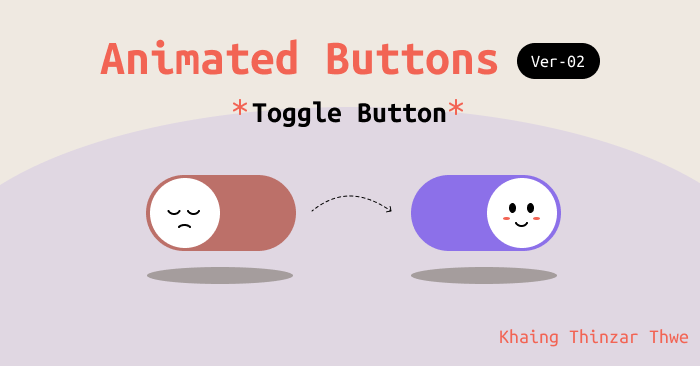
အားလုံးပဲ မင်္ဂလာပါ။ ဒီတစ်ပတ်မှာတော့ အရင်က ရေးခဲ့ဖူးတဲ့ “Animated Buttons” ဆိုတဲ့ခေါင်းစဉ်အောက်မှာ ထပ်ဖြည့်တဲ့အနေနဲ့ toggle button လေးအကြောင်းကို မျှဝေပေးချင်ပါတယ်။ ညီမကတော့ Spiceworks Myanmar မှာ Junior Web Designer အဖြစ် တာဝန်ယူလုပ်ကိုင်နေတဲ့ ခိုင်သဥ္ဇာသွယ် ဖြစ်ပါတယ်။
ပထမဆုံး toggle button ကို figma နဲ့အရင်ဆွဲပြပါ့မယ်။
frame တစ်ခုအရင်ယူပါ။ အဲ့ frame ထဲမှာ ပုံပါအတိုင်း နောက်ထပ် frame တစ်ခုယူပေးပါ။
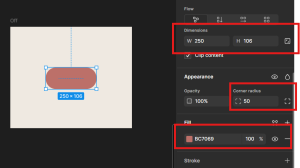
fig: step1
frame ထဲမှာ circle တစ်ခုဆွဲပေးပါ။
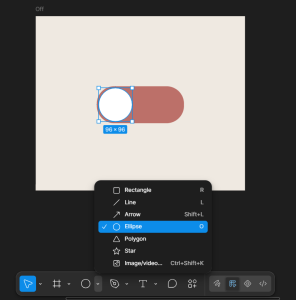
fig: step2
“Off” လို့နာမည်ပေးထားတဲ့ frame ကို copy ကူးပြီး “On” လို့နာမည် ပေးပေးပါ။ button ကို ကိုယ်နှစ်သက်ရာ အရောင်ပြောင်းနိုင်ပါတယ်။ ဆက်ပြီး “Off” နဲ့ “On” ကို copy ကူးပြီး နောက်ထပ်နှစ်ခုထပ် create လုပ်ပေးပါ။ ပုံပါအတိုင်း circle ရဲ့ ထောင့်စွန်းကနေ drop ပုံစံလေးဆွဲပေးပါ။ အောက်ကပုံအတိုင်း create လုပ်ရပါမယ်။
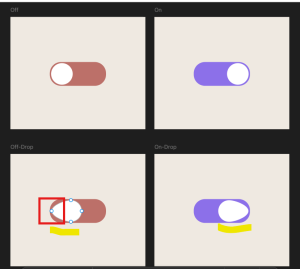
fig: step3
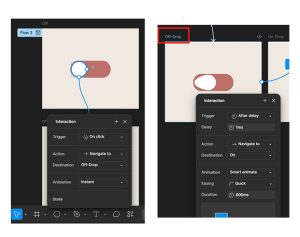
fig: step4&5
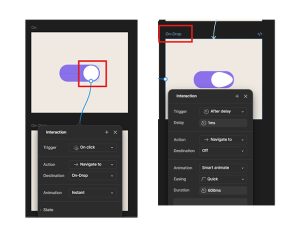
fig: step6&7
ဒါဆိုရင် ဒီဇိုင်းနဲ့ prototype ကတော့ပြီးသွားပါပြီ။ code နဲ့လည်း အပေါ်မှာပြောခဲ့သလို button ပုံစံလေးရေးလို့ရပါတယ်။ ဒီ blog မှာတော့ code အကြောင်းကို မဖော်ပြတော့ပါဘူး။ demo နဲ့ code ကိုတော့ အောက်က demo link မှာ ဝင်ရောက်ကြည့်ရှုနိုင်ပါတယ်။ ကျေးဇူးအများကြီးတင်ပါတယ်။
Demo
https://carrot-animated-buttons.vercel.app/
Version 01 Blog